Showing posts with label V4. Show all posts

Saturday, 28 February 2009

Upgrading to the Next Version of Dynamics Ax

We are all faced with doing an upgrade to the next version of Ax and when faced with this we have to review all of the customizations having been done to upgrade / change / remove them depending upon their relevance.


This part of an upgrade project can from experience take between 10% of initial development effort all the way up to and including 100%+ of the initial dev effort depending upon what and how modifications were done.


The 100%+ example list of do not do's are :


-:

Changes to std BaseEnums sequence and related code, f.ex. I had a customer / consultant precede me on a case where they decided it would be a good idea to change the salesorder type enumerated type and add some new types in the middle of the list :-(. Upgrading this was an unnecessarily big job if they had just created them at the end with a big gap in the enum it would have been much less of an issue anyhow.


-:

Duplication of classes and calling these duplicated classes instead of the standard class, the problem here is that the layers mechanism of resolving / helping upgrade is negated and one is forced to export the class and do a manual external comparison.


-:

Writing code in unusual places, that is in screen buttons, on the datasource of screens, in the datasource fields on screens.


-:


Changing the standard data structure relationships in data as well as classes.

Partial list ends here TBC

Take Care

Sven

Friday, 20 June 2008

Performance Issues Resolution in Ax Part II

After finishing this work on Ax V4 Ax V2009 was rolled out and my work should really start over again.

However as I am lazy I will simply try to migrate the code and tell you more afterwards.

Noted some interesting changes in V5 as regards multi threaded execution of processes using the new batch service.

Will report back on this later in more detail.

/Sven

Wednesday, 28 May 2008

Adding a storage Dimension (Inventory Status)

I have before written about my frustrations as regards Dynamics Ax’s lack of a status inventory qualifier.

In order to somewhat help in this regard I have made an example project with the addition of a new Inventory Status table.

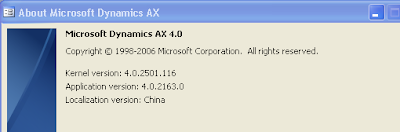
The project is done in a Standard 4.01 SP2, to be precise it is :
The Chinese Localization does not pose any issues as such as no elements touched are touched by the LOS layer where it resides furthermore none have been touched by the SYP either. I used a VPC I had onhand and it happened to have this installed.


I have added the standard sales and purchase status codes in the Inventory Parameters screen


For a full implementation where they are instead added as parameters on the customers brought to sales and on the suppliers brought to purchase, with a group on the item table defining what statuses are allowed for any given item please look to a later release which will be released given time and will include other innovations as well to develop the thoughts into a more useable module. This is more done in the spirit of sharing :-) a work in progress.


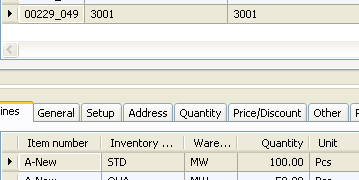
On a purchase order you can after importing the project and setting up an item with an Item dimension group that includes the item configure purchases to send items to any inventory status.


I have created a small label file and added labels for French, German, English and US English.


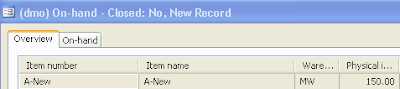
The inventory on hand screen now can show you.

The total on hand of your item or the broken down on hand qty.
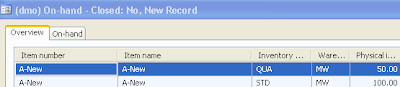
And you can now see the main purpose of this modification. It is to allow you to manage stock logically without using the warehouse for the purpose.


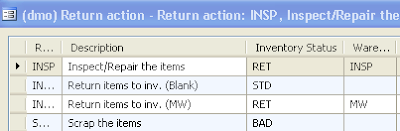
We can now create reject stati instead of having to create reject warehouses we can add a status to the return reasons screen and have our returned goods in the normal warehouse but with a flag indicating that they are returns.


Or even a flag indicating that they are unusable (no control of this is done that means you can still sell this stock though you have to choose it to do so)

You can also use the new status for things other than Quality related issues, you can use it to denote stock you have lent out for demonstration purposes f.ex.


Or stock that you have allocated to specific customer categories, or even specific customers.


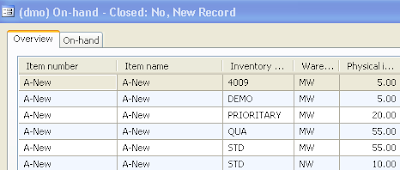
Giving an on hand picture more like this one.


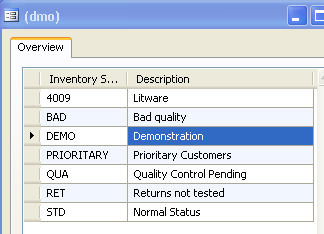
With the categories being configured as follows


All up to you to configure but it opens up quite a number of possible trade related uses for not a lot of coding changes.

You do however wind up doing a lot of transfer journals when you want to change the status of your inventory, fortunately they are reasonably simple to do.


Another thing you must do, depending on what you want to use the added dimension for, is to configure the inventory dimensions with this as one that has the primary stocking flag set and probably also the physical and Financial inventory flags set.


I will not go into what all the flags do but let you use the standard documentation to help you determine how you want to use the new dimension.

All the standard sales related restrictions immediately apply.


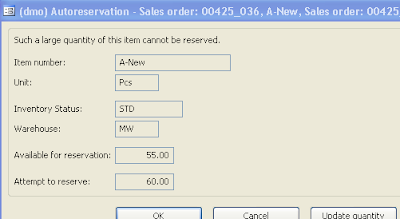
F.ex. the reservation screen knows to limit orders against the not available status, which is quite neat and nifty considering the few lines of code involved.


The above is by no means a complete documentation of the possibilities of this little modification nor is it to be construed as a limiting factor on what you can do with this modification.

Now comes the less amusing parts of this:


Note that by downloading and or by importing the linked code you are accepting the licensing conditions, if you give the code to anyone else you must also apprise them of these licensing conditions and they must agree to them prior to using the code.

The full conditions are the ones given by the OSL http://www.opensource.org/licenses/osl-3.0.php in this link which basically allows you to do anything including use it commercially.

Here is the link to the file for download.


/Sven


Monday, 26 May 2008

In search of Performance (Finance this Time)

I have not noticed when exactly the change was made but when posting to the LedgerBalanceTrans and LedgerBalanceDimTrans the date is no longer always the first or last day of a financial period it is the equivalent of the Transaction date. Validated from V3 onwards.

This has important performance impacts on reporting when you use financial dimensions actively.

Normally you would expect to see a factor of reduction in number of transactions going from LedgerTrans to LedgerBalanceTrans and DimTrans, in practical use I see that most of the implementations I visit the relationship is more like a 10% reduction in DimTrans and 20% in BalanceTrans which is not much and almost makes these tables almost redundant.

In any case the advantage in performance using these tables rather than the LedgerTrans directly for reporting is not very big.

An easy means of seeing whether you have this issue is to configure your chart of accounts to show the current balance, if the display is jerky and slow which is the case very often it means the level of summary provided by the LedgerBalance View on the LedgerBalanceTrans is not sufficient to allow for a speedy summary of the ledgerbalances to date.

Another is to review the number of rows you have in LedgerTrans and in LedgerBalanceTrans & DimTrans respectively if the later are much smaller the optimisation is functional in your case if not you will eventually have a slower system as regards reporting.

What I would suggest is to ensure that it is possible to have a level of consolidation in the Balances so that they are reasonably fast for reporting purposes of course this means that we will slow down posting slightly however I believe the gains in reporting justify the expenditure :-).


/Sven

Friday, 2 May 2008

Performance and Inventdim PII

I wrote on this subject a few months ago and a comment was made that perhaps a solution could be found by creating appropriate views and stored procedures.

I have in several instances tried the problem is the sheer volume of information that the SQL db is asked to manipulate.

Concrete example, the customer had built up a database of 24 million inventory transactions, there were 2,5 million lines in inventdim, inventsum had 6 million lines, the only active dimensions were the configuration on the inventory side and the warehouse, location and palett on the storage side. No serial numbers or Batch numbers so reasonably limited usage of inventdimid's. They used FIFO costing so inventsettlements were not too bad around 16 Million.

We ran a valuation report as at 3 months in the past. The report was unable to complete after 100 hours of processing time. The server was a quad processor with 32 Gb of RAM and a dedicated 15 K RPM raid 0+1 array with 24 disks in it, no penny pinching there.

The problem lies in the volume of data.

A consultant that helped design the above data model came and installed his solution which basically takes the data from inventtrans + Inventdim + inventsettlement and creates a flat table from the result. 12 hours of processing time. Afterwards the valuation report was printed in less than 10 minutes.

I think the above illustrates my problem with the current data model, having said all this many customers will never notice the issue as they do not have huge amounts of transactions. But as we all know over time systems grow and well this one does not have an archiving tool :-).


/Sven

Sunday, 16 March 2008

Performance and InventDim

I find that the impact of the datastructure choosen to implement Inventdimensions is too heavy performance wise and I would really like to see MS - Ax Team in the future revise this structure.

In the product developped before called XAL the inventory dimension fields were present in the tables concerned that is we had the Warehouse as a field on the equivalent to the SalesLine, CustInvoiceTrans, InventTrans etc etc.

Finally this approach allowed for really huge datastructures with simple index based group by type queries and simple index constructs. Compared to the forced joins we have in our current inventsum sphagetti code especially with the huge number of inventdim records when using Batch or Serial numbers.

What would I like to see :

1. Delete Inventdim as a table (whew what a performance boon that would be)

2. Create an Array field like the finance dimensions Called InventSKU with three fields Config, Size and Colour

3. Create an Array field InventStorage with three fields Warehouse, Location, Pallet
( add a fourth one called Site for version 5 compatibility )

4. Create an Array field InventCondition with three fields Batch, SerialNumber, and Condition

I only introduced one new field in the above as compared to V5 and two new fields V3 and V4 (V5 Adds one)

5. Add the above array fields to all tables containing inventdimID, I realise that this means 2 times the fields for the transfer table and will cause a lot of code changes :-)


However the performance improvement in large scale installations !!!!


Also the ease of adding new Inventory dimensions !!!!


The simplification of inventsum logic !!!!


Take Care
Sven

Thursday, 21 February 2008

How to test for a methods implementation

I had a little problem and could not find any reference to a way of doing this, I needed to check before hand if a method was implemented in a given class.

After a little bit of searching I came to the sysDictClass which implements a method that enables you to call a method of a class.

This Method is called InvokeObjectMethod it accepts a classid and a method name as a string parameter and invokes the method, if the method does not exist it will return an error.

Here is the complete Method code

public static anytype invokeObjectMethod(Object _object, identifiername _methodName, boolean _tryBaseClass = false)

{
DictClass dictClass = new DictClass(classidget(_object));
DictClass dictClassBase;
DictMethod dictMethod;
int i;
;
for (i=1; i<=dictClass.objectMethodCnt(); i++)
{
if (dictClass.objectMethod(i) == _methodName)
{
dictMethod = dictClass.objectMethodObject(i);
if (dictMethod.parameterCnt() == 0)
{
// invokeObjectMethod is listed as a dangerous API. Just suppress BP error;
// CAS is implemented by DictClass::callObject.
// BP deviation documented

return dictClass.callObject(_methodName, _object);
}
throw error(strfmt("@SYS87800", _methodName));
}
}
if (_tryBaseClass && dictClass.extend())
{
dictClassBase = new DictClass(dictClass.extend());
// BP deviation documented

return SysDictClass::invokeObjectMethod(dictClassBase.makeObject(), _methodName, _tryBaseClass);
}
throw error(strfmt("@SYS60360", _methodName));

}


As you can see the code has pretty much the functionality required to do the job, it cycles through the methods on a given class and tests for the existence of the wanted method by comparing the names.


So the above requires little change to create the below code:

public static boolean xxxObjectMethodExists(Object _object, identifiername _methodName, boolean _tryBaseClass = false)

{
DictClass dictClass = new DictClass(classidget(_object));
DictClass dictClassBase;
DictMethod dictMethod;
int i;
;
for (i=1; i<=dictClass.objectMethodCnt(); i++) { if (dictClass.objectMethod(i) == _methodName) { return true;

}
}
if (_tryBaseClass && dictClass.extend())
{
dictClassBase = new DictClass(dictClass.extend()); // BP deviation documented
return SysDictClass::xxxObjectMethodexists(dictClassBase.makeObject(), _methodName, _tryBaseClass);
}

return false;
}

I have in the above setup indentations etc but they are not working but the code should work if you just copy and paste it in.

Why did I need the above well I am working on a replacement of the Batch processing in Ax as I have too many operational problems with the Batch processing and I have decided it is time to create a Batch processing framework that can be called from the OS through COM and that can be used to execute any class in the system.

So I needed to know whether a class implemented a dialogmake method in order to know whether I can call one. I want to be able to execute also runbase classes not only runbasebatch classes :-).

But if you have another need feel free, plus if you have a better way also feel free to say so

Take care
Sven

Monday, 18 February 2008

Refreshing screen Info PIII

I have a few months back found a solution.

And as is often the case I found the solution in someone else's code :-).

Columbus have developed an integration tool called Galaxy, and this tool imports data into a container and then presents that data using a mask in a form, the presentation top labels have exactly the same requirements as my size / color grid screen.

That is as the user moves down and selects rows the labels at the top should change.

So what is the answer ?

Well it may seem strange but the following works.
Set the first label field to ' ' that is:
QtyGrid1.label(' ');
and then proceed and set the others.

I do not know what flag is activated or set of by the fact of setting the label field to a 32 ascii however it forces a re-draw and thereafter everything works as expected.

As I lifted this from a version of Galaxy intended for V3 I believe the fix works in both I can certainly confirm that it works in V4.

Have fun

Sven

Thursday, 23 August 2007

V4 Service pack 2

Just installed this on one of my installations and found much to my consternation that MS has continued to rename tables.

Even in Service Packs !

The Country as it was in V4 and SP1 is now AddressCountryRegion which is consistent with the rest however .....

Anyhow enough said I have not found any others, so far.

/Sven

Correction:
Palle commented that as far as he knew the Country had been renamed in V4, and he is right, what happened is that the upgrade process from V3 allowed the object to retain it's old name all the way through to SP2 but no further.

So what I thought was an SP2 issue was in fact an issue related to the upgrade process.

Sunday, 12 August 2007

Support Policy bugbear

Was just going through Customersource recently and found an article deatiling the new MS support policy for Ax V3 etc. I found it rather disconcerting, it seems the time frame given to support is now around 17-19 months, from official release of the previous SP.


Version Release date Support ends
Microsoft Dynamics AX 3.0 SP4 May 17th, 2005 April 10th, 2007
Microsoft Dynamics AX 3.0 SP5 February 28th, 2006 July 8th, 2008
Microsoft Dynamics AX 3.0 SP6 May 1st, 2007 January 13th, 2009


Rule is :


(Subsequent SP Release Date + 1 Year + 2nd Tuesday at start of next new quarter)


The issue is the time it takes for the customers to actually upgrade their versions is much longer than the interval between SP's and the issues caused by implementing the SP's sometimes outweigh the advantages gained. Especially as the SP's do not only contain corrections but also slip stream functionality releases, of course this is not the intention however MS should recognize reality in this regard.


The rule previously was that MS supported the versions 5 years from release date of the last SP. The latest policy change is obviously intended to incite customers to expedite their updates from V2.5, 3.0 to V4.


Unfortunately from my experience this process is far from being a shoo-in or in other words simple task, and will require the expenditure of a significant amount of time to effect for each of the companies that envisage this upgrade.


As the V4 upgrade did not contain a large number of functional changes, many customers will probably choose to wait for V4.1 or 4.5 now renamed V5.0 to do their upgrades as this is supposed to be the one containing a large number of functionality extensions.


In other words

V4 = Technical oriented upgrade ( new enforced AOS, AOT additions )

V5 = Functional oriented upgrade ( no new tech but lots of functionality (promised) )


V5 I have just been told may be delayed to sometime end 2008, probably even 2009.


Now many customers will be in a bind, pay the consultancy costs of doing an upgrade from V3 to V4 with no business justification based on features or wait for V5, but as a consequence live for som time outside of the support conditions recently imposed by Microsoft.


I believe it would be beneficial for MS to provide support for a longer period of time of the previous versions and service packs what do you think :-)

/Sven

Friday, 20 July 2007

Refreshing Screen Info in V4 PII

After a lot of further studying it seems that it is not Lock / unlock that have been disabled but the flag that deems whether the screen needs redrawing that does not get set by the fact of updating the labels of the columns in a grid so my problem may not be V3 to V4 related it may be general.

Great, well I have a call in and I am trying all sorts of detours in order to get the form to update the column headers, so far the only reliable one is for the User (!) to click on the scroll bar below the grid.

A single click is enough to redraw :-(.

I have not tried to move the screen back into V3 in order to see how V3 will cope with it, it seems a rather retrograde step to undertake especially as it is meant for a V4 implementation.

Anyhow will post on this subject again later.

Take Care
Sven

Thursday, 19 July 2007

Performance issues resolution in Ax Part I

This is a subject on which a lot has been written by any number of people so I will concentrate on some small parts of the issues relating to this, and this is not meant as anything else but a starting point.

Mostly when you have problems in Ax, as in most other ERP systems :-), it is related to some sort of contention that is concurrent access to key central information, or alternatively to large quantities of data being used/created.

In most of the instances I have seen the quickest fix on SQL is always just adding more memory, not that I am a big advocate of throwing money at the problem but well that is normally the cheapest solution these days.

In SQL 2000 and 2005, the main issue is centered around one fact, lock escalation, basically your server can if it deems to be running out of memory decide to start locking not each row but a page (unit of storage used to contain multiple rows in the database) and even the whole table. When this happens you tend to get a situation where everyone is waiting for each other.

Picture Picadilly circus bus stop on a busy afternoon where you have lots of busses all coming in to pick up / drop off passengers and having to wait for each other and thereby causing havoc for other traffic, that is the best physical representation.

In Ax say the CustTrans table is concerned or InventTrans then as one process is using it another 5 different ones want to use it too, they cannot as the first is blocking and they use other tables which they then block for others thus making a traffic jam in the database.

SQL decides to do this lock escalation when it has used more than a certain percentage of the available memory that it has to manage locks, thus if you give it more memory to play with it is less likely to do lock escalation and therefore to create the traffic jam.

In SQL 2005 some new functionality has been added concerning Index Lock escalation, however this is hard to add in Ax as information on the indexes, as these are created by the syncronization engine. You would have to add the information by hand on each index :-( after creation and then redo this everytime Ax runs a syncronization.

Additionally as you can see in this KB where means of reducing the lock escalation are discussed it is possible to switch of using the startup flag -T1211 however the resulting error condition of it running out of memory is not pretty.

One option that seems intriguing is the option of making an incompatible higher level block

BEGIN TRAN
SELECT * FROM mytable (UPDLOCK, HOLDLOCK) WHERE 1=0
WAIT FOR DELAY '1:00:00'
COMMIT TRAN

in Ax the tables classically affected are a series of well known ones, the problem with the above in Ax (as well as most other ERP's) is that one hides others etc. If f.ex. you resolve your issues on CustTrans then perhaps CustTransOpen or CustSettlement becomes the problem etc etc so this is often not a solution that we can use to resolve our escalation issues, also unless we do the locking for the whole business day we do not handle all the cases :-(.

Changing our queries is the next possibility mentioned to create smaller transactions.

Well, that is something that is possible in a limited fashion, you will have to clarify functionally with the business whether they can accept the consequences, f.ex. not make sales orders with moe than xx lines in them. Not do recap invoicing, etc etc.

What you can do is use the system to help you detect where you have problems and also use the system to dissect exactly the problem is being originated from.

A number of tools are availeable to you, the main one which I recommend all Ax sysadmins to get familiar with is the SQL tab under the User Options of each User.

This provides an invaluable help in order to get information about what parts of your system are not performing as expected.

What I suggest all sysadmins to do is to as a minimum activate the SQL tracing set a threshold of perhaps 2000 (2 secs it is in milliseconds) and to store long queries and deadlocks in the Table (database).

This will store in the database (accessible under Administration/Inquiries/Database/SQL Trace log the detail of every time a query took more than 2 seconds to execute, including the complete call stack of the process when this happened. You can even jump directly to the offending code and view / edit it.

With a little reflection it is always possible to optimise such queries and to thus reduce your performance issues, it is just a question of thinking about it clearly.

In V4 a few impediments have been placed on your way to having this level of information you have to enable Client Tracing on the AOS instance otherwise the table will be empty as the process will not be called.

Also in V3 KR1+ you have an extended toolkit that you can install, after installing the KR which you should have acces to through customersource or partnersource this allows you to control in detail what is being tracked and also allows you to log blocking behaviour, any process waiting more than 3 seconds on another will automatically log the fact that it is being blocked and thus you can see the effect that the "picadilly peak hour jam" has had on your system.

The good thing about logs is you can be factual about the increase / resolutions that you apply to your system.

Unfortunately MS have not seen fit to extend the above tracing extension into V4 probably because it was a separate development path. I have I think now managed to migrate most of it onto a V4 SP1 based system, the only issue I have is with the blocking monitor, I need to work a little on the SQL side to find out what I need to do exactly in order for it to operate.

Once it is complete I will post it here for you.

Take Care
Sven

Sunday, 15 July 2007

Dynamics Ax 4 SP2

At my last MS presentation there was a big part of the session devoted to the coming of this SP in June this year, and one thing they mentioned which I am very much looking forward to is that it should include some AIF methods allowing for updates of data.

Today the AIF is purely an Insert or Send style interfacing tool.

Of course this is not my only gripe nor others for more go to Dave's blog on the subject he is asking for anyone having live implementations to go and tell him what they have live.

Unfortunately I have so far only got a Proof Of Concept up and running so I do not have any live flows yet. However we will have when we can trust and ruggedize the application probably somewhere around 20 Companies doing SO-PO type flows with automated corrections at several levels.

The proof of concept shows it is possible but with a lot of code changes to ensure that the AIF is operational at all times.

We had issues with the COM connector (.NET) we had issues with the non existent update methods etc etc.

Anyhow more on this later but please follow up on Dave's blog and make him feel less alone on the forefront of this issue.

Take Care
Sven

Tuesday, 10 July 2007

Refreshing screen info in V4

I have come accross a small change in behaviour from V3 to V4 which could potentially be rather adverse in its effects.

In V3 if you want to update a screen f.ex. and refresh it in a uniform manner then you called

element.lock()
/*
did all your manipulation of screen elements
called redraw or refresh (if you needed to re-read the data)
*/
and
called element.unlock()

The functions are still there but they currently seem to do nothing, I suspect it is related to MS teams taking over some of the screen painting functionality and they are probably using some other MSFT code package to update screen information. But this leaves me pretty much in limbo as I have to get the user to activate the scroll bar to change the screen elements as redraw seems to have been de-activated as well.

Anyone else noticed the above and more to the point has anyone found a workaround to this annoying little bug ?

I will share here if I find one, my google help engine has not worked :-), I have not seen it commented publicly anywhere yet. And on the MS help the only discussion thread I could find was from 2004 and a bit off topic.

Take Care
Sven

Friday, 22 June 2007

V3 - V4 Interesting bug

I had an interesting experience the other day, actually I was pretty infuriated initially but now that I have done it I can laugh about it.

I had to create for a fashion related business a "vertical" order entry screen as opposed to horizontal one as found in Ax.

The project calls for the creation of up to 50 columns of size/Color/style related columns against which it is possible to enter the qty one wants to order.

In order to carry out the modification I used array based fields (not sure it was the best decision but it allows me to extend the screens etc quite easily) and I dragged the array of fields into a grid then proceeded to declare the fields as being visible to ther elements.

Then I tried to call them but stubornly the pre-compiler treated the call as an error and would not allow me to look up the fields.

Strange ? They were declared I tried debugging my form and in the debugger I had all the functions properly declared as they should be.

Thinking it was a problem with the length of the names I renamed a field, then the system said illeagal name ? Interesting, apparently when you drag the fields on to the grid they are autonamed with a [xx] extension name based on the array element they represent however [ ] are not leagal names for fields :-).

So I had to go through and rename all my fields if I wanted access to them in the grid. Wonderfull stuff ! Not !

Anyhow have reported it to one of our partners and hopefully he will get them to change it at some time in the future.

Take Care and Have Fun
Sven

Tuesday, 8 May 2007

Dynamics AX Base Data Model Part II

I ended the previous message on this subject by discussing the inventdim and stating that the introduction of this element had caused quite a lot of heartache in many installations.

In the previous product (XAL) the fields constituting the stock keeping unit as well as the stocking dimensions were found in all the relevant tables, from the sales order lines through the invoice lines down to the inventory transactions themselves.

When Benny was designing the database for the new model some smart Db developer suggested normalising this structure by creating a reference to a new table that contained the information.

This would significantly reduce the amount of data stored in the database, as now the transaction files would only contain a reference id (inventdimid) rather than all the fields (ConfigurationId, SizeID, ColourId, etc). Another thing that this simplified was the ability to add more dimensions to the table seemingly effortlessly, or at least with minimal effort.

So now inventdimid was added to

InventSum (Summary Table containing sum of inventTrans for that dimension combination or inventdimId)

InventSumLogTTS (Used by MRP when doing reduced calculations and also by IMTS)

SalesLine (Sales order lines default values for InventDimId)

PurchLine (Purchase order lines default values for InventDimId)

CustConfirmTrans

CustPickingListTrans

CustPackingSlipTrans

CustInvoiceTrans (Sales order flow lines note could be different InventDimId’s attached to lines in inventTrans that are attached to each document line)

VendPurchOrderTrans

VendReceiptListTrans

VendPackingSlipTrans

VendInvoiceTrans (Similar to above flow except this time purchase related, again same comment applies that the InventdimID of the line could be different on the linked InventTrans)

InventTrans

Are some of the main tables containing our new InventDimId field, I have not mentioned the MRP, Warehouse management, project, requirement planning tables that also include it but you can easily add those your self if you wish.

Note some notable additions in V4

InventSumDelta
InventSumDeltaDim

And

InventSumDateTable
InventSumDateTrans

Because of the nature of inventory valuation reports and their dependence upon the data contained in the above and 2 further tables that are intrinsically linked to the valuation of stock

InventSettlement (Contains all the inventory re-evaluations that have been carried out against any given transaction)

InventTransPosting (Contains the accounts on which valuation and re-valuation has posted values pertaining to a given inventory transaction)

It is given the data structure necessary to create a report using InventTrans joined to Inventdim through the InventDimId joined to InventSettlements in best case and in worst case with a search on the settlements in order to populate a report with correct values.
And if the report is as of a date it is even worse as it has to then first look at inventsum, deduct the inventtrans and or invensettlements that it has done after the date, trusting the user to have carried them out correctly and then present the resulting information as it’s version of the truth.

The Select statement looks like some version of the below taken directly from some of the classes doing this:
select forceplaceholders sum(CostAmountPhysical) from inventTrans
where inventTrans.StatusReceipt == StatusReceipt::None &&
inventTrans.StatusIssue == StatusIssue::Deducted &&
inventTrans.ItemId == itemId
exists join inventTransPosting
where inventTrans.VoucherPhysical == inventTransPosting.Voucher &&
inventTrans.DatePhysical == inventTransPosting.TransDate &&
inventTrans.InventTransId == inventTransPosting.InventTransId &&
inventTransPosting.InventTransPostingType == InventTransPostingType::Physical &&
inventTransPosting.IsPosted == NoYes::Yes
#inventDimExistsJoin(inventTrans.InventDimId,inventDim,inventDimCriteria,inventDimParm);

postedPhysicalValue += inventTrans.CostAmountPhysical;

select forceplaceholders sum(CostAmountAdjustment) from inventSettlement
index hint ItemDateIdx
where inventSettlement.ItemId == itemId &&
inventSettlement.Cancelled == NoYes::No &&
inventSettlement.Posted == NoYes::Yes &&
inventSettlement.TransDate > perDate &&
inventSettlement.SettleModel == InventSettleModel::PhysicalValue
exists join inventTrans
index hint RecId
where inventTrans.RecId == inventSettlement.TransRecId &&
inventTrans.StatusIssue == StatusIssue::Deducted
#inventDimExistsJoin(inventTrans.InventDimId,inventDim2,inventDimCriteria,inventDimParm)
exists join inventTransPostingPhysical
index hint DateVoucherTransIdx
where inventTrans.VoucherPhysical == inventTransPostingPhysical.Voucher &&
inventTrans.DatePhysical == inventTransPostingPhysical.TransDate &&
inventTrans.InventTransId == inventTransPostingPhysical.InventTransId &&
inventTransPostingPhysical.InventTransPostingType == InventTransPostingType::Physical &&
inventTransPostingPhysical.IsPosted == NoYes::Yes;

postedPhysicalValue -= inventSettlement.CostAmountAdjustment;

Regardless of how much you may update / optimise your SQL server given that there are a large number of rows in InventTrans, double that in InventTransPosting and at least double that in InventSettlements (if using average costing) the above query is deadly for the database in terms of performance.

In order to counter this Benny has developed his fast reporting tool which you will find advertised on his web site, and MS have added the InventSumDateTable and the InventSumDateTrans tables which basically do the above queries but store the results in a table which is then consultable.

Unfortunately again the table does not contain a simple date rather they have chosen to have just a parmId reference stipulating the reference number of the calculation having been carried out, and then to use adjustments based on this so again if you want the values as of a date you are stuck doing a subsequent query to get back to a situation back in time.

Enough about InventDim & InventDimId.

InventSum as stated earlier contains a summary of the linked InventTransactions based on the InventdimID associated broken down by the StatusIssue and StatusReceipt fields the transaction is summarized in this table.

This action is carried out based on any change to the inventTrans table, that is the simple fact of doing an update or insert on a record in that table will automatically be reflected in the InventSum table, if it is an update 2 inventsum records could be affected (if the inventdimid changes).

The InventTransPosting table contains the Ledger accounts that have been impacted (posted on) during the update of either a physical transaction or a financial transaction. The reason for having this table is to allow subsequent revaluations of the inventory transactions to be posted in the GL using the same account numbers as the original transaction.

Example:
We introduce a new item in the catalogue, and purchase 100 pieces with an assumed price of 1 units / piece, we receive the items in stock and start selling the items.

When we have sold half the lot of 100 we receive the purchase invoice which is for 90 cents / piece only as we have already had COGS (Cost of Goods Sold) recognized as 50 * 1 unit or 50 Units on the total of 90 (90 cents * 100) there are only 40 units left to share on the remaining 50 units this makes the COGS / piece = 40/50 or 80 cents on the remaining 50 units.

To correct the above Ax has an inventory costing mechanism that allows the system to recalculate a more accurate valuation and correct the COGS of the already sold transactions.

The InventSettlement table will contain the corrections to the existing transactions which would deduct 10 cents / piece for the old invoices and add 10 cents to any new ones.In order to ensure the right accounts and financial dimensions are impacted the account numbers as well as the financial dimensions are stored in the InventTransPosting table.

Sound complicated well not really compared to others it is quite simple but meethinks I will continue later.

/Sven

Monday, 16 April 2007

Upgrading from V3 to V4 Part IV

I have one final gripe as regards this process, label files. Someone in their infinite wisdom decided to cancel the GLS and DIS label files and to integrate these in the SYS label file.

Aside from the gargantuan task involved, I am sure somewhere along the lines some countries lost some labels, the above is a pain in the neck for anyone having used in their code references to "System" labels that ostensibly would never disappear.

Now the best means of finding these instances is to export all modifications by creating a project containing all elements changed and searching the resulting text file for invalid label references.

Much to my consternation I have found that some of the SYS labels have also disappeared / been renamed, this is to me rather incomprehensible.

What motivation could there be for this ?

What does it mean if you have used any system labels in your code then you need to revisit every single one to ensure it's validity / proper understanding, that seems excessive.

Best Regards
Sven

Thursday, 12 April 2007

New Fix distribution policy Horror from MS

Someone in their infinite wisdom in MS has decided that any fixes to the product Dynamics AX 4.00 SP1 onwards will be distributed in an aod file directly.

Why do I state that this is horrible ?

Well all fixes will be lumped into one DIS file and new versions will be sent out as new fixes are added, so now we have 4 SP and DIS version number questions that need to be answered by support.

When installing a new DIS to fix one small issue that perhaps necessitated a 2 line fix we are obliged in a user installation scenario to get everyone out recompile the whole application and also what is really the worst part of this decision, re-validate all process flows as we are implementing a patch not a fix, namely all of the code in the DIS file which might and will probably impact a number of other processes.

As those who have been around can testify one man's bug is another man's feature, I cannot cite any V4 examples yet as most of the bugs I have seen fixed are really bugs. However in V3 SP4 the code doing inventory reservations was "fixed" so that it always started reserving from the Warehouse / Pick Location rather than just Warehouse level as it did in earlier versions.

Of course if the Pick Location is present then it should try and reserve from there and not just pick any location in the warehouse, however I had several clients who had built code based on the premise that AX functioned as it did before the fix, subsequent to the SP implementation their code broke and reserved nothing threw spurious error messages etc etc.

What the above policy means is that all functionality that is important has to be tested every time a fix is implemented, in other words a fix has to be treated as if it was a SP.

This is not really a wise policy and I hope MS will reconsider and continue providing fixes as distinct XPO's with correct table, field, and object id's so that we can introduce these in the system with the least possible disruption.

Imagine:

The system is down because it calculates VAT incorrectly (see previous discussion) and we are waiting for a fix from MS, they find it and send us a 5 Mb aod file containing all the fixes. So now we have to do a weeks validation before being able to implement the fix to 2 scripts because all sorts of other scripts are "fixed" as well.

I can see that building all the fixes in one environment is easier for MS and allows the next SP to be constituted in an incremental fashion as it is the AOD file in question, however releasing this into nature just means we have lots of "SP's" being released all the time which is not very optimal for the reasons I state here.

Best Regards
Sven Jochimsen
.

Wednesday, 14 March 2007

Upgrading from V3 to V4 P3

Well here we go I carry on my run through of some of the obstacles I have faced in upgrading from V3 to V4.

The CreateLine function on the SalesLine Table has an added parameter that controls credit checking behaviour, incosiderately MS have choosen to add the new parameter before the last parameter which is a string. This means that even though it is defaulted if you are using that last parameter your code fails because of type checking.

They should really think before acting !

Hopefully for the future they will not in version 4.1 4.5 5.0 repeat some of these rather cavalier changes all over the place.

What's with the changing of all the tab page elements in all forms to be named Tab, do they not realise what pain they cause for any changed forms, you cannot just migrate you practically have to hand code / port the changes.

And making what I would call gratuitous changes to the names of Tabs inside a form is just silly, why do you need to rename a Tab from NotificationToCentralBank to NotificationToTheCentralBank example taken from the CustTable form.
Anyhow making long names in Ax is sometimes counterproductive as only a certain number of characters are used to distinguish elements so it can actually be dangerous unless V4 is improved in this area.

But in any case such changes are silly and add nothing to the value of the product.

To be continued

/Sven

Tuesday, 13 March 2007

Upgrading from V3 to V4 P2

As stated in the earlier posting here is the continuation of my meanderings through the process of upgrading Dynamics Ax V3 code to V4.

Several tables have been renamed completely unexpectedly.

I have not found them all mind you just the ones that were used by the code I had the pleasure to upgrade.

The SmmQuotation tables have been renamed SalesQuotationTable which is what everyone knows from the whats new.

What I had no inkling of is that SalesPickingListJournalTable had been renamed to InventPickingListJournalTable likewise the lines and the form that is attached to the lines etc etc. As I had code that was dependent upon this and the code was not being imported it did not switch over to the new naming convention so I had a field day finding everything ;-).

A lot of screens will keel over as MS has had a field day renaming functions all over the place, albeit to more logical names but they should know that doing this is not with out consequences
F'ex the Function EmptyAddressField in the AdressMap which clears the data in the adress fields of any entity with adress fields attached is now called clearAddressField, which is more logical than the old naming convention but it does force you to revisit any code you built around this.

The TmpSalesLine table used by the old Address screen has been renamed to the SalesCreateReleaseOrderLineTmp table however the TmpPurchLine retains its old name, go figure on that one ?

I will continue as I go adding more

Best Regards
Sven